


The G-Lab Kult Nitrogen Atom gaming mouse
The Kult Nitrogen ATOM gaming mouse guarantees extreme precision for maximum in-game efficiency!
Original price was: 19,99 €.16,00 €Current price is: 16,00 €.
 amazon.fr
 E.Leclerc FR
 GrosBill FR
 Cdiscount
 Pixmania
 Cultura
 Fnac
Fnac

Original price was: 19,99 €.16,00 €Current price is: 16,00 €.
Description
ULTRA PRECISE AND FAST. The Kult Nitrogen ATOM gaming mouse guarantees extreme precision for maximum in-game efficiency! Its high-performance optical sensor allows you to adjust the sensitivity up to 4800 DPI via 6 levels. You can also adjust the polling rate up to 125 Hz for exceptional responsiveness! With a maximum acceleration of 8G, this mouse ensures perfect tracking of all your fastest movements.
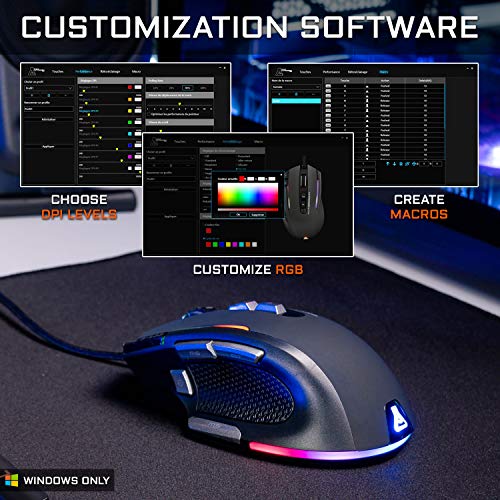
RGB 16.8 MILLION COLORS. The Kult Nitrogen ATOM lets you choose from 16.8 million colors for a vibrant and dazzling backlighting that you can customize to your liking! Thanks to its software, compatible only with Windows, you can also choose from 9 backlighting effects. You can adjust the brightness and speed of the lighting effects. This gaming mouse will illuminate your desk and can be matched to the colors of the rest of your gaming setup.
9 PROGRAMMABLE BUTTONS. Take full advantage of all the features of the Kult Nitrogen ATOM mouse thanks to its customization software. You can program each of the 9 mouse buttons and save profiles for each game. Assign macros to each button and perform complex actions in record time with a single click. This is a huge advantage over your opponents! Save time adjusting your DPI, lighting effects, and Windows shortcuts.
ERGONOMIC + LIGHTWEIGHT DESIGN. A good grip is essential for optimal gaming performance. The Kult Nitrogen ATOM features an ergonomic shape for absolute comfort, even after hours of gameplay. This ultra-lightweight mouse weighs only 100g and adapts perfectly to all hand sizes. Its soft-touch coating and silicone side grips ensure a secure hold.
Additional information
Specification: The G-Lab Kult Nitrogen Atom gaming mouse
|
Price History
Reviews (2)
2 reviews for Souris gaming The G-Lab Kult Nitrogen Atom
Add a review
You must be logged in to post a review.


 French
  English
IN –
This gaming mouse is very comfortable to hold, beautifully designed, and efficient. It's very fast, efficient, and pleasant to use, with customizable colors and lighting effects thanks to a downloadable program from the manufacturer. The only downside is that sometimes the colors go out of sync, requiring adjustments in the program. It's not a big deal, but if it happens frequently, it can be slightly annoying. Honestly, I like it far too much to really care about that. I use it for gaming, working in Lightroom, and writing. The cable is long, flexible, and durable. Everything about the mouse is of very high quality, resulting in a visually pleasing and reassuring experience. (I appreciate this marketing detail.)
NCB –
Excellent value for money. A very good product, especially considering its price. However, it's worth noting that the software available on the manufacturer's website isn't necessarily the correct one. If the downloaded software displays a message asking you to plug in the mouse, tough luck, you need the other one! I had to contact technical support (which was quick, by the way) to get the right software. Once this inconvenience was resolved, everything worked as expected. It's a shame that G-Lab doesn't combine these two programs, or at least doesn't offer both for download… The mouse does indeed have 6 buttons (in addition to the standard left/right clicks and scroll wheel). However, it should be noted that the software doesn't make it easy to modify these buttons. Here's a little tip for those who want to change the button behavior: create a macro with a function key (like F10/F11/F12), check that the game doesn't have a shortcut assigned to that key, and then associate the button with this newly created macro. It's a bit cumbersome, but it offers great flexibility. Quick settings can be created to change them on the fly within the software. The cable seems to be of good quality, but be careful with dust. It loves to collect it! Similarly, the two side sections will need to be cleaned regularly to prevent them from becoming a grime (slightly visible in the photos). Regular promotions, mouse/keyboard/pad combo for €60… The whole setup works well and creates a pleasing sense of cohesion on the desk. The few compromises are negligible compared to the prices charged by Logitech, among others. It all depends on what you expect from these peripherals: for entertainment-oriented use without getting into competitive gaming, it's more than sufficient.